| .github/workflows | ||
| archetypes | ||
| assets/sass | ||
| content | ||
| images | ||
| layouts | ||
| static | ||
| .gitignore | ||
| hugo.yaml | ||
| LICENSE | ||
| README.md | ||
| theme.toml | ||

Air, a theme for Hugo.
The intent of this theme is to provide a solid starting place for Hugo sites with basic features and include best practices for performance, accessibility, and rapid development.
Live Demo
Just visit francoiducat.github.io/hugo-air-demo
Local Demo
- Clone this repo
- Add markdown files in the content folder
- Run
hugo serve
Features
| Awesome features |
|---|
| ✨ Full Responsive |
| ✨ Bootstrap ready |
| ✨ Custom Header Image from page bundle |
| ✨ Shortcode Image Gallery from page bundle (Instagram or Masonry Style) |
| ✨ Page Type Image Gallery from page bundle (Instagram or Masonry Style) |
| ✨ Single-page landing homepage |
| ✨ Embedded Google Maps |
| ✨ Smooobu Booking shortcode |
| ✨ Multilingual Support shortcode |
Installation
First Installation: as a git submodule
Install Air Theme as a Git Submodule. Naviguate to the folder of your Hugo site run:
git submodule add https://github.com/francoiducat/hugo-air.git themes/air
Update an existing installation
If you already have Air Theme installed, naviguate to the folder of your Hugo site run:
git submodule update --remote --merge
Usage
Edit your config file
baseURL: https://example.com/
languageCode: en-us
title: Example Site
theme: air
params:
  author:
    name: François
    siteUrl: https://notes.ducatillon.net/
  gmaps_url: https://www.google.com/maps/d/u/0/embed?mid=1UySq5HRbcRKL90dKuFpX6PRRtx0&ehbc=2E312F
  mainColor: "#386641"
  footer: "Hugo Air theme is great and customizable"
menu:
  main:
  - name: Home
    url: /
    weight: 20
    params:
      target:
  - name: Features
    url: /features
    weight: 30
    params:
      target:
  - name: Shortcode Gallery
    pageRef: /features/shortcode-gallery/
    parent: Features
    weight: 20
  - name: Landing Page
    url: /landing-page
    weight: 40
    params:
      target:
  footer:
  - name: Home
    url: /
    weight: 20
    params:
      target:

markup:
  goldmark:
    parser:
      attribute:
        block: true
    renderer:
      unsafe: true
Customize main color
In your config file, add:
params:
  mainColor: "#386641"
This will override the main.scss
/*
=======================================================
=                   CSS Variables                     =
=======================================================
*/

/*
Main color for the website
It can be overridden in the config file by setting "Params.mainColor" to any color value
*/
:root {
  --main-color: #035c8c; /* default color */
}
Set Google Maps url
In your config file, add:
params:
  gmaps_url: https://tinyurl.com/mr3uesbx
Setup Google Analytics
In your config file, add:
services:
  googleAnalytics:
  id: G-12345  #Replace with your Google Analytics ID
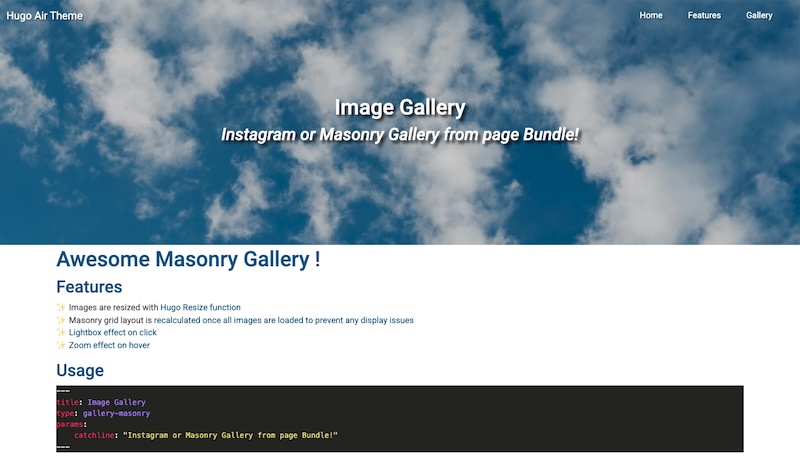
Image Gallery
Use as partial
In your .md file, specify the type of the page with type: gallery-masonry or type: gallery-insta like this:
---
title: Air is a great hugo theme
type: gallery-masonry
---
Air is a great hugo theme with outstanding features like image gallery from page bundle
Use as shortcode
Assuming your folder structure would look something like this
content/
└── pages/
    └── my-page/                # Page Bundle
        ├── index.md            # Page content
        ├── featured-image.jpg  # Image Resource used as gallery image 1
        ├── card.jpg            # Image Resource used as gallery image 2 AND as card featured image
        ├── photo1.jpg          # Image Resource used as gallery image 3
        ├── photo2.jpg          # Image Resource used as gallery image 4
        └── photo3.jpg          # Image Resource used as gallery image 5
In your .md file, add this block to display your instagram image gallery
{{ < gallery-masonry page="my-page" > }}
where "my-page" is the page bundle object passed as a variable to the shortcode
Alternatively, use instagram gallery style with
{{ < gallery-insta page="my-page" > }}
Custom Header image
Add one image called featured-image.jpg in your page bundle.
Use as a featured header image in single.html
Automatically loaded as a header image on your page
Use the default featured header image
Automatically loaded from the static/img folder.
header-960.jpgfor screens higher than 960pxheader-480.jpgfor screens lower than 960px
Custom Bootstrap Card image
Use as featured card image in list.html
When listing pages/posts, it displays bootstrap cards with a thumbnail image.
By default it uses the card image from static/img/card.jpg
Customize the card image by adding one image called featured-image.jpg or card.jpg in your page bundle.
Single-page landing homepage
Add pages to a folder. These page will render as a single-page.
Example with this page bundle:
content/
└── landing-page/
    └── page-1/                 # Page Bundle
        ├── featured-image.jpg  #
        ├── index.md            # Page 1
    ├── _index.md               # File that calls the landing-page type
    ├── page-2.md               # Page 2
    ├── page-3.md               # Page 3
    ├── page-4.md               # Page 4
    └── page-5.md               # Page 5
Edit your content/landing-page/_index.md to add type: landing-page
---
title: Landing Page
catchline: Awesome One Page Landing Page
type: landing-page
---
Add a weight to each page to render them by weight ✨:
---
title: Page 1
weight: 10
---
Content of Page 1
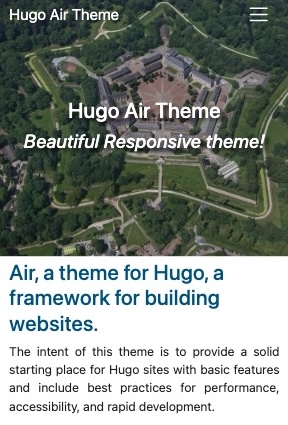
Screenshot
Mobile
Desktop